
With a ngrx-store we keep track of all our state in 1 central place. But why “circle of life”?
Well: the traditional way of writing software is:
- you declare some properties in a component or service
- you start using them (update, read, clear)
With ngrx-store we work in a loop (the circle of life of your state properties):
- components (and services) reflect state (through observables)
- components send actions to the store
- the store updates its state through reducers
- back to step 1
Slightly more complex, but it turns out to be cleaner and more manageable.
Let me explain it in more detail using this graphic:
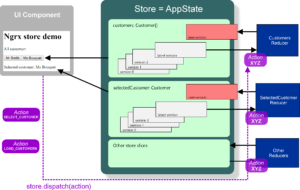
UI components and services can change the state, but this will only be done through actions. In your components you will typically inject the store via the constructor and then you can call the dispatch method and pass the appropriate action (of type ‘Action’):
|
1 2 3 4 5 6 7 |
constructor(private _store : Store<any>) { } public selectCustomer(customer: Model.Customer) { this._store.dispatch({type: 'SELECT_CUSTOMER', payload: customer}); } |
Your store keeps track of 0 or more properties. In the image it is represented by the light-green blocks (such as customers and selectedCustomer). These properties are defined through reducers. A reducer is basically a method:
- accepting the previous state for this property and an action
- and returning the new state (if the action is not appropriate for the reducer, it just returns the same state)
Here is an example for the SelectedCustomerReducer:
|
1 2 3 4 5 6 7 8 9 |
export const SelectedCustomerReducer : ActionReducer<Model.Customer> = (state : Model.Customer = null, action: Action) => { switch(action.type) { case CustomerActions.SELECT_CUSTOMER: return action.payload; default: return state; } }; |
It is important to understand that reducers in your store will recalculate their state whenever a new action is dispatched. So actions are not tied to specific reducers!!
Now you probably wonder where the store is configured. This is done in the ‘/src/app/app.module.ts’ file, and more specific in the imports section of your @NgModule definition:
|
1 2 3 4 5 6 7 |
@NgModule({ imports: [ /* other imports */ StoreModule.provideStore({ customers: CustomersReducer, selectedCustomer: SelectedCustomerReducer}) ] }) |
Remark:
Maybe you noticed that I used Store<any> instead of Store<AppState> where AppState is an interface defining all your state properties and their types. From my experience this AppState is totally irrelevant, so I’m not using this anymore (until somebody can prove the use). The layout of your store is defined by the setup in your app.module.ts file (see above).